May 6, 2026
May 6, 2026
How to Build an AI Ad Creative Workflow for Meta Ads
Build a repeatable AI ad creative workflow for Meta ads, from brief to variants, review, and launch.
Build a repeatable AI ad creative workflow for Meta ads, from brief to variants, review, and launch.
Learn how to build an AI ad creative workflow for Meta ads that turns one brief into repeatable image, video, and copy variants.
If your Meta ads stall because creative is hard to produce fast enough, build a repeatable AI ad creative workflow instead of making one-off assets. The goal is simple: turn one product brief into a batch of usable hooks, images, videos, and captions you can test every week.
This playbook shows a practical workflow for DTC brands, including what to feed the models, how to review outputs, and where to keep the process organized. It is built for speed, but also for consistency, so your team can scale without reinventing the wheel each time.
When this workflow makes sense
Use this approach when you need more creative volume than a small team can design manually. It is especially useful if you already know your offer, audience, and winning angles, but need more variants for testing.
You run Meta ads with frequent creative fatigue.
You need faster output for seasonal drops, promos, or new SKU launches.
Your team wants more variants without adding more designers or editors.
You want a repeatable system, not a stack of scattered prompts.
The workflow recipe
Think of the workflow as a chain: brief, inputs, generation, review, packaging, and launch. Each step should produce something the next step can use directly.
1. Start with a tight creative brief
Do not begin with prompting. Start with the facts that define the ad:
Product name and category
Primary benefit
Secondary proof point
Audience segment
Offer or incentive
Brand tone
Format needed, such as 1:1, 4:5, 9:16
Example brief input: “Hydrating body serum for dry skin, audience is women 25 to 40, benefit is fast absorption and visible glow, offer is 20 percent off first order, tone is clean and confident.”
That single brief should feed every downstream asset so your outputs feel connected instead of random.
2. Turn the brief into creative angles
Generate 3 to 5 angles before making assets. Angles give the AI a direction and help you avoid bland variations.
Problem-solution, “dry skin that never feels greasy”
Ingredient-led, “why this formula works”
Outcome-led, “glow in one step”
Social proof-led, “what repeat buyers like about it”
Offer-led, “try it now with 20 percent off”
For each angle, write one hook line, one supporting claim, and one visual cue. That is enough to generate a coherent asset set.
3. Generate asset families, not single assets
A useful workflow creates families of creative, where each family shares one angle but changes the execution. For Meta ads, a good starter set is:
3 hook lines
3 static image concepts
2 short video scripts
3 primary text options
3 headline options
Example output for the same skincare brief:
Hook line: “Glow without the heavy feel.”
Static concept: product on clean bathroom tile, soft natural light, dry-skin callout badge
Video script: 6 to 10 second before-and-after routine showing texture, application, and finish
Primary text: benefit first, then ingredient proof, then offer
Keep the outputs specific. Generic outputs are harder to review and harder to test.
4. Produce image, video, audio, and copy together
Meta ads perform better when the creative components feel coordinated. If the image says one thing and the copy says another, the ad feels disjointed.
Use the same angle across all formats:
Image: product hero, ingredient close-up, or lifestyle context
Video: hook in the first second, product use, result, and offer
Audio: simple voiceover that mirrors the written hook
Text: one primary message, one proof point, one reason to click
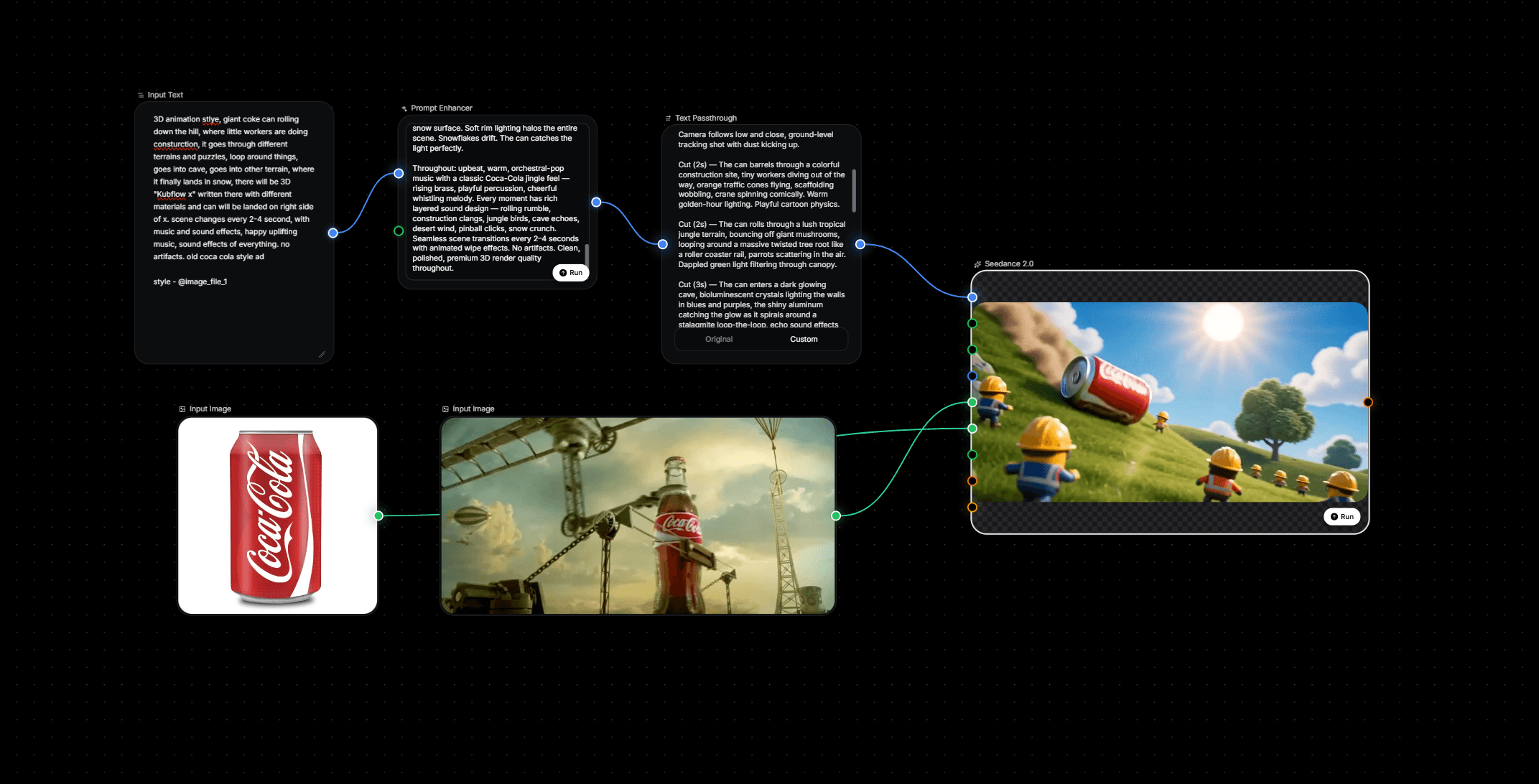
This is where Kubflow helps, because you can connect image, video, audio, and text models inside one visual workflow builder. Instead of juggling separate tools and prompt docs, your team can run the same creative system every time.
For example, one workflow can take a brief, generate 5 hooks, route those hooks into 3 image directions, then pair each direction with matching ad copy and short-form video scripts. That gives you a reusable production line for Meta testing.
5. Add a review step before launch
AI output is only useful if someone checks it against the brief. Keep review fast and consistent with a simple checklist.
Does the asset match the product and offer?
Is the claim accurate and supportable?
Does the hook make sense in the first second?
Does the visual match the target audience?
Is the copy short enough for Meta placement?
If an asset fails two or more checks, send it back for revision. Do not try to rescue weak creative with media spend.
How to structure repeatable variants
The easiest way to scale testing is to vary one thing at a time. Change the hook, the visual, or the proof point, but do not change all three unless you want a new concept entirely.
Test element | What changes | What stays the same |
|---|---|---|
Hook test | Opening line, headline, first frame | Offer, product, audience |
Visual test | Background, layout, framing | Angle, copy, product |
Proof test | Ingredient, testimonial style, claim framing | Hook, visual style, offer |
This makes it easier to learn what actually moved performance. If one hook wins across several visuals, you have a message worth scaling.
Cost and review notes
An AI workflow can reduce the time spent producing first drafts, but you still need a human gate for brand, claims, and placement fit. Plan for a lightweight review pass on every batch.
Use one person to approve claims and offer language.
Use one person to check design consistency and crop safety.
Keep a shared folder or workflow log so winning outputs are easy to reuse.
Do not overproduce. Ten assets that match the brief are more useful than fifty random variants.
A simple weekly operating rhythm
If you want this to stick, run it on a weekly cadence:
Monday: choose one product and one angle.
Tuesday: generate hooks, images, scripts, and copy.
Wednesday: review and revise the best variants.
Thursday: export the approved set.
Friday: launch and tag results by angle.
That rhythm keeps creative production moving without turning it into a huge project.
Where Kubflow fits
Kubflow is useful when you want the workflow itself to be the asset. Instead of building prompts in documents and moving files between tools, you can create a visual AI creative workflow for ecommerce ads that repeats the same steps every time.
For Meta ads, that means one reusable flow for briefs, structured variant generation, review, and export. It is a cleaner setup for teams that need more creative volume, faster iteration, and less manual coordination.
If you are still producing ad creative by hand, start with one product, one angle, and one weekly batch. Then move that process into Kubflow so the workflow becomes repeatable.
Quick answers
How many creative variants should I launch at once?
Start with a small batch that covers different hooks or visuals, then learn from the results before expanding. The exact number matters less than making each variant meaningfully different.
Should the AI write the final ad copy?
It can draft the copy, but a human should check the claim, tone, and clarity before launch. That keeps the output aligned with the brand and the offer.
What is the biggest mistake in AI ad creation?
Using AI to make isolated assets instead of a connected workflow. When brief, visuals, copy, and review are linked, the creative is easier to scale and reuse.
If you want a repeatable system for Meta ads, build the workflow first, then plug in the models. Kubflow gives you the structure to do that without adding process chaos.



Learn how to build an AI ad creative workflow for Meta ads that turns one brief into repeatable image, video, and copy variants.
If your Meta ads stall because creative is hard to produce fast enough, build a repeatable AI ad creative workflow instead of making one-off assets. The goal is simple: turn one product brief into a batch of usable hooks, images, videos, and captions you can test every week.
This playbook shows a practical workflow for DTC brands, including what to feed the models, how to review outputs, and where to keep the process organized. It is built for speed, but also for consistency, so your team can scale without reinventing the wheel each time.
When this workflow makes sense
Use this approach when you need more creative volume than a small team can design manually. It is especially useful if you already know your offer, audience, and winning angles, but need more variants for testing.
You run Meta ads with frequent creative fatigue.
You need faster output for seasonal drops, promos, or new SKU launches.
Your team wants more variants without adding more designers or editors.
You want a repeatable system, not a stack of scattered prompts.
The workflow recipe
Think of the workflow as a chain: brief, inputs, generation, review, packaging, and launch. Each step should produce something the next step can use directly.
1. Start with a tight creative brief
Do not begin with prompting. Start with the facts that define the ad:
Product name and category
Primary benefit
Secondary proof point
Audience segment
Offer or incentive
Brand tone
Format needed, such as 1:1, 4:5, 9:16
Example brief input: “Hydrating body serum for dry skin, audience is women 25 to 40, benefit is fast absorption and visible glow, offer is 20 percent off first order, tone is clean and confident.”
That single brief should feed every downstream asset so your outputs feel connected instead of random.
2. Turn the brief into creative angles
Generate 3 to 5 angles before making assets. Angles give the AI a direction and help you avoid bland variations.
Problem-solution, “dry skin that never feels greasy”
Ingredient-led, “why this formula works”
Outcome-led, “glow in one step”
Social proof-led, “what repeat buyers like about it”
Offer-led, “try it now with 20 percent off”
For each angle, write one hook line, one supporting claim, and one visual cue. That is enough to generate a coherent asset set.
3. Generate asset families, not single assets
A useful workflow creates families of creative, where each family shares one angle but changes the execution. For Meta ads, a good starter set is:
3 hook lines
3 static image concepts
2 short video scripts
3 primary text options
3 headline options
Example output for the same skincare brief:
Hook line: “Glow without the heavy feel.”
Static concept: product on clean bathroom tile, soft natural light, dry-skin callout badge
Video script: 6 to 10 second before-and-after routine showing texture, application, and finish
Primary text: benefit first, then ingredient proof, then offer
Keep the outputs specific. Generic outputs are harder to review and harder to test.
4. Produce image, video, audio, and copy together
Meta ads perform better when the creative components feel coordinated. If the image says one thing and the copy says another, the ad feels disjointed.
Use the same angle across all formats:
Image: product hero, ingredient close-up, or lifestyle context
Video: hook in the first second, product use, result, and offer
Audio: simple voiceover that mirrors the written hook
Text: one primary message, one proof point, one reason to click
This is where Kubflow helps, because you can connect image, video, audio, and text models inside one visual workflow builder. Instead of juggling separate tools and prompt docs, your team can run the same creative system every time.
For example, one workflow can take a brief, generate 5 hooks, route those hooks into 3 image directions, then pair each direction with matching ad copy and short-form video scripts. That gives you a reusable production line for Meta testing.
5. Add a review step before launch
AI output is only useful if someone checks it against the brief. Keep review fast and consistent with a simple checklist.
Does the asset match the product and offer?
Is the claim accurate and supportable?
Does the hook make sense in the first second?
Does the visual match the target audience?
Is the copy short enough for Meta placement?
If an asset fails two or more checks, send it back for revision. Do not try to rescue weak creative with media spend.
How to structure repeatable variants
The easiest way to scale testing is to vary one thing at a time. Change the hook, the visual, or the proof point, but do not change all three unless you want a new concept entirely.
Test element | What changes | What stays the same |
|---|---|---|
Hook test | Opening line, headline, first frame | Offer, product, audience |
Visual test | Background, layout, framing | Angle, copy, product |
Proof test | Ingredient, testimonial style, claim framing | Hook, visual style, offer |
This makes it easier to learn what actually moved performance. If one hook wins across several visuals, you have a message worth scaling.
Cost and review notes
An AI workflow can reduce the time spent producing first drafts, but you still need a human gate for brand, claims, and placement fit. Plan for a lightweight review pass on every batch.
Use one person to approve claims and offer language.
Use one person to check design consistency and crop safety.
Keep a shared folder or workflow log so winning outputs are easy to reuse.
Do not overproduce. Ten assets that match the brief are more useful than fifty random variants.
A simple weekly operating rhythm
If you want this to stick, run it on a weekly cadence:
Monday: choose one product and one angle.
Tuesday: generate hooks, images, scripts, and copy.
Wednesday: review and revise the best variants.
Thursday: export the approved set.
Friday: launch and tag results by angle.
That rhythm keeps creative production moving without turning it into a huge project.
Where Kubflow fits
Kubflow is useful when you want the workflow itself to be the asset. Instead of building prompts in documents and moving files between tools, you can create a visual AI creative workflow for ecommerce ads that repeats the same steps every time.
For Meta ads, that means one reusable flow for briefs, structured variant generation, review, and export. It is a cleaner setup for teams that need more creative volume, faster iteration, and less manual coordination.
If you are still producing ad creative by hand, start with one product, one angle, and one weekly batch. Then move that process into Kubflow so the workflow becomes repeatable.
Quick answers
How many creative variants should I launch at once?
Start with a small batch that covers different hooks or visuals, then learn from the results before expanding. The exact number matters less than making each variant meaningfully different.
Should the AI write the final ad copy?
It can draft the copy, but a human should check the claim, tone, and clarity before launch. That keeps the output aligned with the brand and the offer.
What is the biggest mistake in AI ad creation?
Using AI to make isolated assets instead of a connected workflow. When brief, visuals, copy, and review are linked, the creative is easier to scale and reuse.
If you want a repeatable system for Meta ads, build the workflow first, then plug in the models. Kubflow gives you the structure to do that without adding process chaos.